Boost your PC volume above its maximum
Letasoft Sound Booster is a multimedia tool that can boost your computer’s audio above its maximum level. You can use it to increase volume on your laptop, raise the output of worn speakers, or hype up the sound from any app in your system by 500%. Sound Booster supports all major Windows OS: Windows XP/Vista/7/8/10, of which both are 32- and 64-bit.
Top Recommended Alternative

You can use Letasoft Sound Booster to raise the volume of web browsers and chat software (such as Zoom or Skype) alike. You can also use Letasoft Sound Booster as an alternative means to increase the volume in your favorite media player (like Windows Media Player or VLC) or better hear other players in a multiplayer game.
Amplify and adjust sound in real time
When you consider all the functions that keep your computer working properly, audio usually falls secondary after user input, graphics, or stability. In actuality, there are many factors that can cause a computer’s audio to falter, ranging from bad speakers and a broken sound card to software settings, in-app sound controls, and any failure that can often occur between these elements.
What makes Letasoft Sound Booster so useful is that it serves as a safety net when you don’t know what the problem is and troubleshooting is possible. Since a computer’s audio has to jump through so many hoops before its output reaches the user, this app serves as a useful way to puppeteer all your audio with one manager overlay, ensuring that you’re always able to hear properly.
Letasoft Sound Booster can make even the smallest, quietest of speakers sound loud and powerful, lifting its capabilities above the hardware’s standard maximum. Any audio coming through your speaker, no matter the source, can therefore experience the boosting power. Alternatively, if you’re having issues hearing your friends over Skype, Sound Booster can also interact with that specific application. It processes the program’s output audio stream before it reaches your computer’s sound card input.
Since this app can effectively quintuple the strength of any audio output from your computer, you can postpone buying new speakers. For the more audio-sensitive users, it also means that you can more easily regulate speaker gain, eliminating feedback. If your current speakers suffer from excessive crackling or hissing, for example, when pushed to their maximum volume, you can achieve the same effect with Letasoft Sound Booster without having to raise speaker volume manually.
Letasoft Sound Booster integrates with Windows to install a new audio processing object and amplifies sound in real time. It requires no manual tweaking, extra loading, downloading, launching time, or additional setup. Once the app is installed, it just puts an icon in the Windows taskbar system tray.
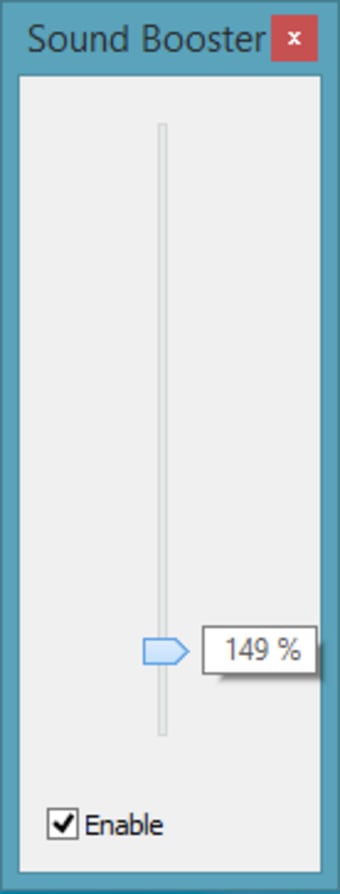
From that point, operating the program is made easy: Simply click the icon to open the volume slider. You can drag the knob to increase or decrease as you desire. You will still be able to maintain a program’s volume to their prior capacity, but you’ll notice you can now adjust the slider up far beyond the standard 100%.
There’s also a configurable hotkey that can make adjustments on the fly much more manageable, especially if you’re using Letasoft Sound Booster in tandem with a game. Doing so is recommended in general, since voice chat functions over Steam or Discord can suffer from latency and poor mixing. The app is a great way to mitigate and balance chat alongside the game.
By default, F10 and F9 can increase and decrease volume respectively, but they can be mapped to preference. Letasoft Sound Booster boots up automatically whenever you start Windows, which is handy for quickly accessing your audio configuration. Right off the bat, it will constantly monitor your current gain level to prevent samples from clipping and reducing major sound distortions. Finally, you can disable the launch on startup as well via the ‘startup’ menu in your Task Manager.
Letasoft Sound Booster vs Boom 3D
Letasoft Sound Booster simply boosts sound, but there are other products on the market that offer more bells and whistles. Boom 3D is one such option for both Mac & Windows. An award-winning pro audio enhancement app, Boom 3D was designed to play media content with 3D effects over headphones, from any player, and with any media or streaming service.
The major difference between Letasoft Sound Booster and Boom 3D is that the latter choice focuses more on balancing and equalizing audio rather than just boosting it in general. If you’re looking for a solution that has more customization and fine-tuning options for audio (albeit a slightly steeper learning curve), Boom 3D is arguably the better choice.
Aside from less effective mixing options than the competition, there are a couple of other caveats to Letasoft Sound Booster. One is that turning the volume up to maximum may still cause crackling and distortion. While these are often caused by the speaker specifically, depending on the speaker issue causing the distortion, Letasoft Sound Booster will not make a difference.
Additionally, since Letasoft Sound Booster works either as an umbrella volume solution or through targeting specific open applications, it has no way of distinguishing multiple audio sources running the same window. If you have two YouTube videos playing under the same browser session, for example, boosting your browser with Letasoft Sound Booster will only serve to raise the volume level of both videos. This is easily circumvented by viewing one video in a separate browser window.
Effortlessly raise and manage audio
Letasoft Sound Booster is an easy method to amplify a program’s volume when it’s otherwise difficult to hear. If you feel your external speakers can play sound louder than they are, this is a good product to test that theory and potentially restore dying speakers to their former glory. It’s also an excellent way to balance and amplify video calls or audio recorded at lower volumes.